Debit Card-i

Q: How to make purchases with your Debit Card-i?
A: 1. Look for a retailer displaying the VISA/MasterCard/MyDebit logo or with a Point of Sale (POS) System.
2. At the checkout counter, allow the cashier to assist and pay using your Debit Card-i via contactless transaction or Chip & PIN transaction method into the POS terminal. For contactless transactions, you are required to tap your Debit Card-i on the contactless terminal. For Chip & PIN transactions, you are required to insert your Debit Card-i into the terminal and enter your PIN.
3. For contactless transactions of RM250 and below, no PIN is required.
4. Once the transaction is completed, always remember to take back your Debit Card-i
Q: How will your Debit Card-i can be accepted by a retailer?
A: 1. Your Debit Card-i supports two (2) Debit Card brands – either Visa/MasterCard and MyDebit which allows your card to be accepted overseas and in Malaysia. By supporting both Debit Card brands, more retailers will accept your Debit Card-i for payments in Malaysia and overseas.
2. When you use your Debit Card-i in Malaysia, retailers can choose to accept and process payments using either MyDebit, Visa or MasterCard. This is the retailer’s choice and allows them to process payments through their preferred Debit Card network. Please note that you cannot request a retailer to change is preferred Debit Card network.
Do’s
- Personal Identification Number (“PIN”) change at the Automated Teller Machine (“ATM”) and at HLB/HLISB branch via the MyKad Reader is required before you can perform any transaction using your Debit Card-i.
- Treat, value and protect your Debit Card-i as if it were cash, keep your Debit Card-i secured and ensure that it is in your possession at all times.
- When using your Debit Card-i at any merchant, ensure that all details have been entered correctly and completed before signing the charge slip/transaction slip or keying in your PIN. This PIN is the same as the ATM PIN which you use to perform ATM transactions.
- Check and ensure that you receive your Debit Card-i after performing a transaction at a merchant.
- Ensure that you authorise all Debit Card-i transactions (face-to-face or on Phone/Internet).
- When purchasing items over the Internet, give your Debit Card-i details only on reliable websites and from a trustworthy company. Reputable merchant sites use encryption technologies to protect your Debit Card-i information.
- Avoid using a public computer to shop online. If you do, please remember to log off and quit the browser when you are finished. All it takes is for someone to hit the "back button" to view your personal information.
- Always print and save the confirmation page when completing an online purchase.
- Record or keep your receipts for all your purchases including online purchases.
- Shred all documents (charge slip, statement etc.) that contains Debit Card-i details before you discard them.
- Promptly check your Retail Purchase Account statement and report immediately if there are any transactions that you do not recognise or are unauthorised by you.
- Keep the Bank’s phone numbers readily available with you to immediately report any lost or stolen of your Debit Card-i. Always check your Debit Card-i periodically to ensure that the Debit Card-i is not missing from your wallet/purse.
- Notify the Bank promptly of any change of your contact details by visiting the Bank’s branches or calling the Bank’s Call Centre at 03-7626 8899, especially your handphone number and e-mail address, so that the Bank can perform verification of unusual or suspicious transactions. This will also enable the Bank to contact you for any important notices or marketing campaigns (for Cardholders who have opted to receive marketing/promotion) in the future.
- When you receive a call from Telemarketers, the fewer questions they are able to answer, the more likely they are calling from an illegitimate business. Should you feel suspicious of the phone call, kindly contact the number stated behind your Debit Card-i to verify whether the call is genuine from the Bank.
- If you are travelling overseas, you are required to inform the Bank to opt-in for Overseas transactions and/or ATM withdrawal. Failing which, your Overseas transactions and/or ATM withdrawal will be declined.
- You are also required to inform the Bank to opt-in should you want to perform any online (non-3D Authenticated website) and/or Mail Order/Telephone Order (“MOTO”)/Auto Debit transactions. Failing which, your online transaction and/or MOTO/Auto Debit transactions will be declined.
- Note that when you opt-in for Card-Not-Present (i.e. Online, Auto Debit) and/or overseas transactions, there is a risk of your account data being compromised or the information being used for unauthorised purchases and/or cash withdrawals. Please be reminded that in the case of overseas transactions, the card verification features for Point-of-Sales transactions may vary from country to country. Some countries/merchants may not adopt a more stringent approach. Fraudulent transactions may occur if your account data is compromised.
- You may, at any time, opt-out from Card-Not-Present and/or overseas transactions via HLB Connect / branches / ATMs / Hong Leong Call Centre
Don’ts
- Never leave your Debit Card-i in an unsecured place, including but not limited to glove compartment of your car, lying around at home or in the office where someone can have access to it. If you do not want to use your Debit Card-i, keep it in a saved or secured place.
- Do not disclose personal details or your Debit Card-i’s details to any third/unknown party.
- Never reveal your username, password and/or PIN to anyone. You should not respond to such emails, letters, websites or phone calls. No one needs to know your PIN, not even the Bank. Do not respond to emails that ask you to go to a website to verify your personal and/or Debit Card-i’s information.
- Never send Debit Card-i’s information, such as PIN or Retail Purchase Account numbers etc. in an e-mail as it may be intercepted.
- Watch out for imposters/fraudsters that claim to be from the Bank and ask to "verify" your Debit Card-i’s details to make sure you are protected. The Bank does not need your account details as the Bank already has your details.
- When selecting a PIN, always avoid the obvious, such as telephone number, date of birth, identity card number etc. Do not keep a copy of your PIN in your wallet/purse.
- Never provide your Debit Card-i’s information on a website where a link is provided in a suspicious email.
- Never provide your Debit Card-i’s information online unless you are making a purchase.
- Never sign on a blank charge slip/transaction receipt. When you sign a charge slip/transaction receipt, draw a line through the blank space above the total spending amount.
- Do not give or lend your Debit Card-i to anyone. Your Debit Card-i is not transferable and is your obligation to keep it secured
Contactless Functionality
Contactless Transactions without PIN verification are capped at Ringgit Malaysia Two Hundred Fifty (RM250) per transaction (“Contactless Transaction Limit”). Any Contactless Transaction exceeding the Contactless Transaction Limit must be authorised by the Cardholder using the following method:
-
Contactless Transaction (Contactless Card Payment and Mobile Wallet other than Apple/Google Pay): PIN verification.
-
Contactless Transaction (Using Apple Pay and Google Pay): Eligible Device’s authentication mechanism enabled by Mobile Wallet Provider, subject to the applicable Mobile Wallet terms and conditions.
Contactless Daily Cumulative Limit
Contactless Transactions without PIN verification can be performed separately but the cumulative transactions in one (1) day shall be capped at Ringgit Malaysia Eight Hundred (RM800) or such other limit as may be set by the Cardholder. For the avoidance of doubt, Apple Pay and Google Pay transactions will not be added to the Contactless Daily Cumulative Limit. Any Contactless Transaction without PIN exceeding the Contactless Daily Cumulative Limit will be declined. Any Contactless Transaction exceeding the Contactless Daily Cumulative Limit must be authorised by the Cardholder using the following method:
-
Contactless Transaction (Contactless Card Payment and Mobile Wallet other than Apple/Google Pay): PIN verification.
-
Contactless Transaction (Using Apple Pay and Google Pay): Eligible Device’s authentication mechanism enabled by Mobile Wallet Provider, subject to the applicable Mobile Wallet terms and conditions.
The Contactless Daily Cumulative Limit resets on a daily basis and whenever the Cardholder performs a PIN- verified transaction at the Point-of-Sales (POS).
Pin & Pay Debit Cardholder Safety Tips
1. You, and any additional cardholder, must take all reasonable precautions to prevent the Debit Card-i, card number, PIN, password or any other security details for the card or account (the “card security details”) from being misused or being used to commit fraud. These precautions include:
-
sign the Debit Card-i as soon as it is received and comply with any security instructions;
-
protect the Debit Card-i, the PIN, and any Debit Card-i security details;
-
regularly check that you still have your Debit Card-i;
-
keep Debit Card-I receipts securely and dispose them carefully;
-
check your statements regularly and report any suspicious activities immediately;
-
contact us about any suspicious matter or problem regarding the use of the Debit Card-i at a terminal.
-
destroy any notification of the PIN and of any Debit Card-i security details;
-
do not allow anyone else to have or use the Debit Card-i;
-
do not write down the PIN or the Debit Card-i security details nor disclose them to anyone else including the police and/or Hong Leong Bank/Hong Leong Islamic Bank staff;
-
do not allow another person to see your PIN when it is displayed.
2. You must notify us immediately if:
-
your Debit Card-i is lost or stolen;
-
your PIN may have been disclosed/compromised;
-
your Debit Card-i is retained by an ATM; or
-
your address or contact details have changed.
3. You must select or change your PIN to a number selected by you, before the PIN can be used for transactions. Your selected PIN must be one designed to reduce the chance of anybody guessing the numbers you selected. You must avoid unsuitable PINs such as:
-
birth dates, months or years in any form or combination;
-
sequential numbers (such as 345678) and easily identifiable number combinations (such as 111111);
-
any of the blocks of numbers printed on your Debit Card-i; or other easily accessible personal numbers such as parts of personal telephone numbers, identity card number, or other personal data.
Frequently Asked Questions
Q: What is a pre-authorisation?
A: pre-authorisation is a temporary hold of a specific amount from the available balance on the payment card. It is used to verify that the card is active and has sufficient available funds for the transaction.
Q: What happens when I use my Debit Card-i at an Authorised Merchant that requested pre-authorisation?
A: When you use your Debit Card-i at such an Authorised Merchant, the Authorised Merchant will authorise the pre-authorised amount at the point of the transaction. This is performed by sending a pre-authorisation amount on your Debit Card-i to Hong Leong Islamic Bank (HLISB).
Q: What amount will be pre-authorised on my Debit Card-i?
A: The pre-authorisation amount for petrol purchase at self-service pumps is set to RM200 and for any other Retail Purchase Transaction, the pre-authorisation amount is the transaction amount set by the Authorised Merchant and agreed by you.
Q: What if the actual amount transacted is less than the pre-authorised amount?
A: The amount of the pre-authorisation is not a charge and no funds are debited from the Retail Purchase Account, but the available balance on the Retail Purchase Account is temporarily reduced by the pre-authorisation amount. Once you have transacted, the actual amount will be sent to HLISB. At this point, the actual amount will be debited from the Retail Purchase Account, and the pre-authorisation amount is cleared. However, this may take up to twenty-one (21) calendar days after the transaction and the pre-authorisation was generated.
Q: What if my available funds are less than the pre-authorised amount or if I want to avoid a hold of funds on my card?
A: You cannot proceed with your transaction if your pre-authorised amount is more than your available funds. For the purchase of petrol, if you want to avoid pre-authorisation at self-service pumps, you are advised to make payment at the petrol kiosk cashier where the exact purchase amount would be deducted from your account.
Q: What happens if I accidentally tap my Debit Card-i twice on the contactless reader?
A: A contactless Debit Card-i must be very close to the contactless reader at the cashier to work. Your contactless Debit Card-i will only work when the Debit Card-i is within 4cm of the card reader. Furthermore, the reader needs to be enabled by the cashier and this will only happen when the cashier initiates a transaction at the terminal to accept payment. If the contactless reader is not processing a transaction, it will not read any contactless card presented in front of it by mistake.
Q: What happens if I accidentally tap my Debit Card-i twice on the contactless reader?
A: The contactless terminal can only process one transaction at a time. Even if the contactless Debit Card-i is accidentally tapped more than once, you will only get billed once for the transaction.
Q: What happens if I have more than one contactless card in my wallet and I tap my wallet on the contactless reader?
A: If you hold your card up to a reader and you have any other contactless payment cards nearby, the reader might detect more than one card and will not complete the payment. You will need to do the transaction again. You should make sure you only hold one card on the reader and always take it out of your wallet.
Q: What if a fraudster reads my Debit Card-i by placing a contactless reader close to my wallet?
A: In the unlikely event that the contactless Debit Card-i security details can be read by a fraudster through a rogue contactless reader in close proximity to your pocket or wallet. Safeguards are in place to prevent unauthorised use of the intercepted card security details. Each contactless transaction includes a unique code that changes with each purchase. It can only be used once and can only be generated by the chip in the original contactless Debit Card-i. This prevents a counterfeit Debit Card-i from being produced from the intercepted card security details. In the unlikely event of fraud, you will not be held responsible for fraudulent charges or unauthorised purchases made using the contactless feature on your chip card. You must notify us immediately or as soon as reasonably possible of any unauthorised Debit Card-i use or any suspicious activities.
Q: Could a fraudster steal my Debit Card-i and use it to empty my bank account?
A: Safeguards are in place to mitigate the use of a lost or stolen contactless Debit Card-i by a fraudster. There is a low contactless transaction limit of RM250, above which the transaction cannot be authorised without cardholder verification – PIN or signature verification. Transactions are analysed by HLISB and global payment networks in real-time to identify fraud patterns and detect suspicious transactions.
IMPORTANT NOTICE
For seamless transactions with your Debit Card-i, please make sure to:
1. Enable the relevant services on HLB Connect:
a) Overseas Retail Purchase
b) Overseas ATM Withdrawal
c) Online Purchase without OTP
d) Auto Debit/Telephone Order
2. Set your own Debit Card-i transaction limit
3. Always ensure you have sufficient balance in your account before making payments
HLB Connect App
Enable Debit Card for Overseas, Online Spend and Auto Debit Transactions
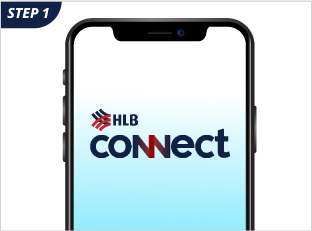
Log in to HLB Connect App
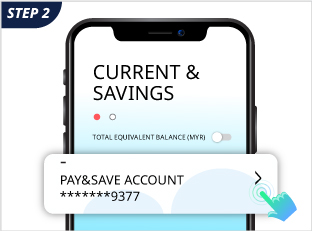
Click on the Current/Savings Account
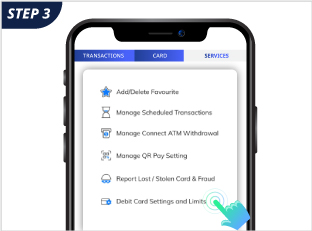
Click on Services, select Debit Card Settings and Limits
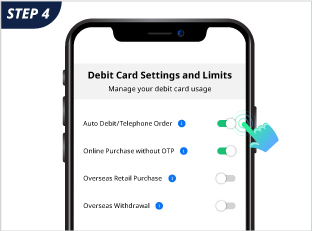
Click on enable/disable the relevant services
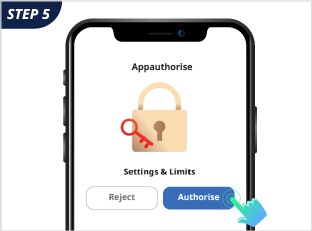
Authorise the request and you are done
How do I change my Debit Card Transaction Limit ?
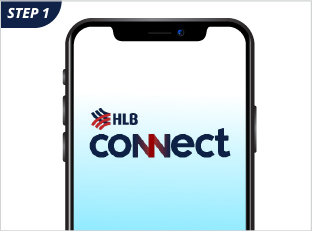
Log in to HLB Connect App
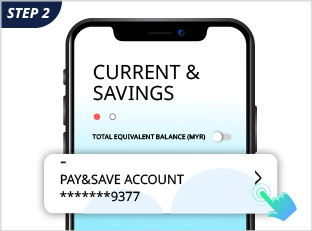
Click on the Current/Savings Account
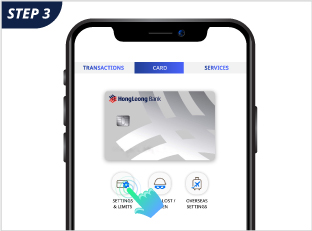
Click on ‘Card’ tab then Click on Settings and Limits icon
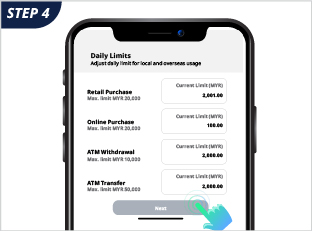
Under Daily Limits, fill in the new
amount in relevant boxes and click Next
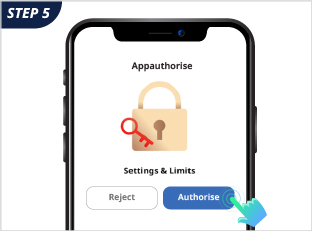
Authorise the request and you are done!
Enable Debit Card for Overseas, Online Spend and Auto Debit Transactions
Log in to HLB Connect App
Under Other Services >
Debit/ATM Card, select Card setting
Click to enable/disable the relevant services
Go to HLB Connect App, authorise the request and you are done!
How do I change my Debit Card Transaction Limit ?
Log in to HLB Connect App
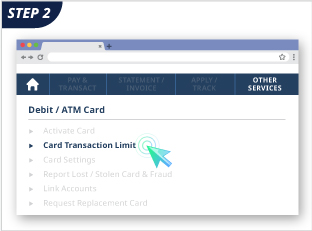
Under Other Services >
Debit/ATM Card, select Card Transaction Limit
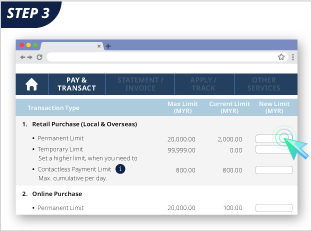
Fill in the amount under New Limit column
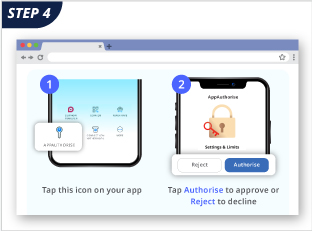
Go to HLB Connect App, authorise the request and you are done!
Q: What is the definition of Overseas transaction?
A: An Overseas transaction is a transaction that is performed outside of the country (i.e. out of Malaysia). Overseas transactions include Point-of-Sale (“POS”) transactions and cash withdrawals that are made at ATMs outside of Malaysia.
Q: What is the definition of Online purchase without OTP?
A: Online Purchase allows consumers to buy goods or services directly from a merchant through the internet (e.g. website/app) that do not require 6-digit one-time password (OTP).
Q: Can I opt-in only for Online Purchase without OTP and not Overseas transactions?
A: Yes, Debit Cardholder may choose to opt in to any of these four (4) types of transactions as below:
a. Overseas Retail Purchase
b. Overseas ATM Withdrawal
c. Online Purchase without OTP
d. Auto Debit/Telephone Order
Q: If I am holding a Hong Leong Islamic Debit Card-i, do I need to opt in as well?
A: You are required to opt in should you want to perform Overseas ATM withdrawal only.
Q: If I opt in to perform Overseas transactions, will it be effective immediately?
A: Yes, it will be effective immediately.
Q: Why am I required to provide my consent to perform Overseas, Online Purchase without OTP, Auto Debit/Telephone Order Transactions?
A: This is pursuant to regulations that have been imposed by Bank Negara Malaysia which mandated all financial institutions and card issuers to default and/or block any Debit Cardholders from making any Online Purchase, Auto Debit/Telephone Order Transactions that are not authenticated via strong authentication method such as dynamic password or any Overseas transactions using a Debit Card-i unless the Debit Cardholder has expressly opted-in to perform such transactions. The requirement to opt-in seeks to ensure that adequate risk management measures and controls are in place among financial institutions and card issuers, and to educate Debit Cardholders on the safe practices in order to mitigate the risks of unauthorised transactions.
Click here to visit our dedicated Feedback and Complaints page for information on how to submit your query or concern.